Home
Administration > Home
On the Home tab, the Registration group provides links for creating class and rental registrations, joining a membership and purchasing an add-on item.
The Tasks group provides links for creating a contact, class, team, rental, or membership.
In the Calendar group, the Master Calendar link displays your organization’s Rental Item Calendar. Off hours for a selected facility are shaded in gray.
In the Reports group, the View Reports link displays the My Reports page.
The Classes starting and Classes ending tables display lists of classes that begin and end within the next seven days. Click a class name to display the Class Details page for that class.
Clicking the Search button  on the activity map refreshes the page to display the Search by Date and Search by Class options. The default value for the date range is the past 30 days. Using these options to define the date or class criteria, then clicking the Search button for either option refreshes the page to display the class locations on the map.
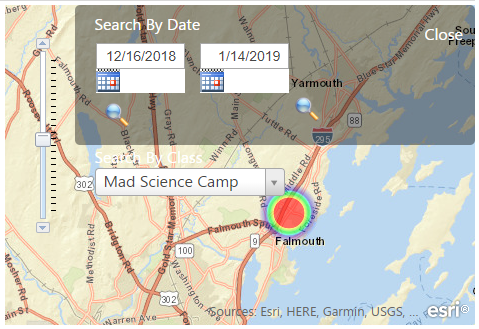
Use the zoom slider in the left margin of the map to expand or restrict the map viewing area.
The area of interest and the zoom scale settings are defined using the GIS Settings option on the Administration tab.