Class Registration Refunds
Parks & Rec > Class > Search > Edit
When a customer requests a refund for a paid class registration and you delete the registrant from the Registrants section on the Class Details page, the Class Refund Fees dialog provides options for processing the payer’s refund. The Fee Amount Refunded displays the fee amount paid for the activity, but you may edit this amount to be less than the paid amount.
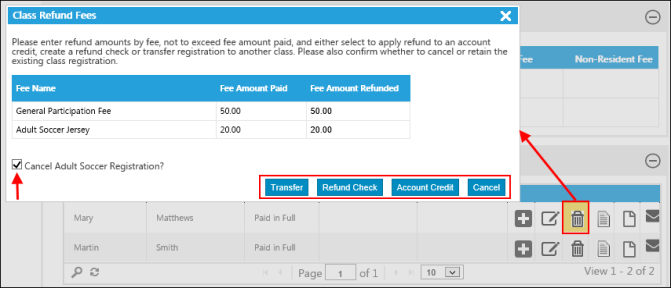
The refund options are as follows:

The Cancel <Class Name> Registration? check box directs the program to cancel the registration and issue the refund. If you clear this check box, the Class Refund Fees dialog refreshes to remove the Transfer option. In this case, the refund is processed, but the class registration remains active.
When you use a credit to pay for a class activity and the class fee is less than the credit, the activity fee is deducted from the account credit, and the remaining amount is refunded. If you register for an activity using the citizen portal and the credit balance is not enough to cover the activity fee, you may select the split pay option and define the payment amount for the outstanding balance.
Note: If a registrant with a credit balance creates a new registration using the citizen portal and the credit balance does not cover the entire registration fee, the payment page automatically indicates a split payment with credit card tender type specified as the payment method for the remaining balance. The registrant cannot change this and must complete the credit card options to complete the payment.