User Role
Administration > System Setup > User Role
User Role maintains roles to which you may assign permissions. When you assign a role to a user, the permissions assigned to the role are automatically assigned to the user.
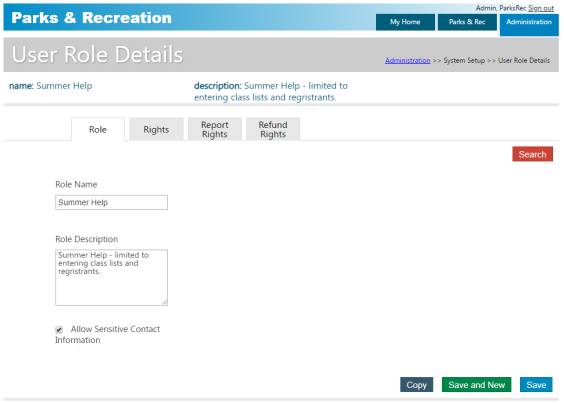
The Allow Sensitive Contact Information check box, if selected, restricts a user’s access to sensitive information in contact records and reports. When you save a role, the Rights, Report Rights, and Refund Rights tabs are accessible.
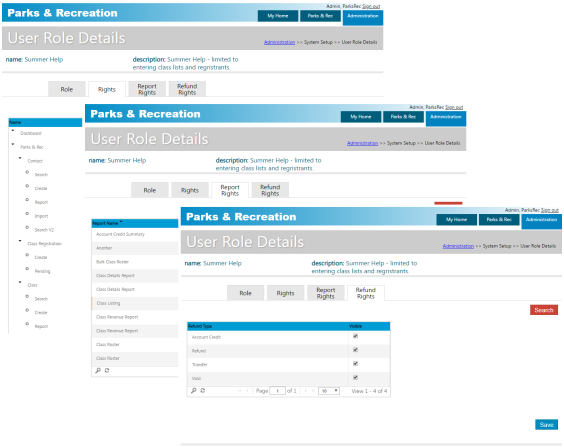
Click Rights to assign permissions to the role, click Report Rights to specify the reporting permissions available to users who are assigned to the role, and click Refund Rights to assign refund permissions to the role.
Refund Rights assign permission to issue refunds, transfers, voids, or account credits. When a user clicks Delete for class or rental registrations that are paid, only those options that correspond to the user roles permissions are available. If refund rights have not been assigned and a user is deleting a pending payment/invoiced registration, the user may remove the registrant/rental record, since a refund has not been made; however, if refund permissions are not granted and a registration has been paid, the program displays a message that the refund process cannot be completed.